Want to see someone else’s likes? http://www.tumblr.com/liked/by/callmeblake
(only works if they have their likes public though).
Just insert their tumblr name at the end of that URL (in place of callmeblake).
TAGS:
Tags are a wonderful way to organize your blog, and most people don’t seem to realize that if you reblog a post, it will not show up in tumblr search with your tag, but only in your own blog. Only ORIGINAL posts will show up in the main search with your tags so make the most of that.
Avoid “&”,“+”,“/”,“%” and (right now) dashes “-” and question marks “?”, tumblr tags don’t know what to do with these and if someone clicks on that tag on your blog they will go nowhere.
Whoa! “What’s with the %20 you say?”, it’s what tumblr turns the spacebar into, you can also use an underscore and tumblr will still find it.
TRACKED TAGS SEARCH LIMIT?:
I know it’s frustrating, but you can in fact only have twenty tracked tags before the tags you are tracking will not show new ones beside them anymore. You can still use it to get SEE them, you just have to check them all manually.
I also read something last night that said after a certain amount of tags on your post the extra ones will no longer show up in search, don’t know how true it is though. Edit: according to justcantdescribeu “Normally, tumblr only indexes your first 5 tags on any post, and tumblr only indexes tags if it’s on an original post, not a reblog. By indexing, I mean the part where you search up tags on tumblr through the sidebar on your dashboard (tumblr.com/tagged). The sixth and further tags won’t be indexed, but they can still be searched up on your own blog. ”
and from yetanothercriminalmindsfanatic“re: tags, first 5 of OP’s post show up in the tracked tags. the first 10 of any post are searchable within a blog. posts retain the first 20. attempt 21 or more, and the extras get swallowed up/disappear after clicking publish/queue/save to drafts. (i’ve had the misfortune of encountering this before)”
If I do: http://callmeblake.tumblr.com/search/gif on my page I used to get one gif.
Edit: Tumblr has improved search quite a bit since I wrote this.
So the rest of this section may or may not be relvant anymore.
OR : *search term* site:*url*
for example, to search the term “gif” on my tumblr:
“gif site:callmeblake.tumblr.com”
For “gif” for mine, this gets 8 results.
However, tumblr’s search is quite crap and I suggest using google internal search if you want better results.
I get 10 pages of results because it’s just BETTER.
When I went to write this it seems like I had more, I wonder what I’m forgetting.
Edit : Some things I forgot:
Theme Recovery:
Helpful if you are getting into changing you theme through the html editor and make a mistake, saves the last twenty changes.
Audio uploads:
Choose a song from soundcloud search and upload it as a draft, go in and replace it with a song from your computer – you can do this multiple times and avoid the “one audio upload a day”.
No need to open your blog’s dashboard to see how many followers, messages, number of queued posts and drafts are left
alt+click your blog title beside “Dashboard”
Reblog long text posts as a whole and not as a link:
Clicking the gray “As…” button beside “Reblog Text Post” above the post; select “As Text” to reblog the full body of the original post.
Find a post’s source:
Hover on the post on your dashboard, notice that the upper-right flap of the white background becomes slightly bent. Click the flap to go to the original post address.
As an apartment dweller, this is a game changer. My current apartment doesn’t have a laundry facility and the closest Laundromat about a 30 min bus ride which is just not practical. The mini-washer is a life saver
The panda mini washer hooks up to the sink, is incredibly lightweight (about 28 pounds, so light even I can lift it) and easy to use.
It has a surprisingly large capacity. The basket from the first picture represents about one and a half loads. The jeans took up a whole load while the rest filled the bin only half way.
Here’s the inside. The left is the washer the right is the spin dryer. Yes, it even drys.
Basically you shove your cloths into the washer, fill it up with water and let it go. I use my shower head to fill it up so it goes faster, the sink hook up took about five minutes to fill the whole tub, with the shower head is is down to a minute an a half. I do it in three wash cycles, a five minute rinse with baking soda, a five minute wash with soap and a three minute rinse with water. You have to drain and refill between each cycle so it’s a little more labor intensive than a traditional washer.
That’s the spin dryer. It’s about half the capacity of the washer so one wash takes about two loads to dry. The spinner is much more effective than I was expecting. A three minute spin gets my cloths about 90% dry. I hang them up to air dry for that last 10%.
The machine cost me about 150$. When you factor in two dollars for the bus, five for the machines (per week), the mini-washer pays for its self after only about six months worth of laundry.
I’m not great at expressing emotion, but I’m hoping you can tell how excited I am. Let me just say that the panda mini-washer is great and I highly recommend it to anyone currently using a Laundromat.
The less time you have to draw something, the less detail you can put down.
So, instead you want to put down as much information about the pose as you can with as few lines as possible!
This is called finding the gesture – the essence of the pose. Forget about form, forget about contour, gesture is about the feeling and the motion!
It’s the first stage to any drawing, it helps to have a general idea of what you want to draw down on the page before you jump into the details.
When working from life, the image of what you want to draw is already in front of you. So before you draw anything, take some time to look at what you are going to draw.
Look for the motion, the lines that travel through the body.
Once you’ve found the motion, you can then draw it.
This is the gesture – it does not yet look like a person because there is no form or contour, but it should still give you a sense of the pose and its motion!
You can then build the forms on top of the gesture.
It’s essentially like drawing stick-men, as you’re drawing lines rather than contours.
Those are gestures I spent a couple minutes on to make them look nicer lmao, but this stage is really quick – this one took about thirty seconds
Also a lil tip: When drawing the gesture, you want to use long continuous strokes.
You’re trying to convey as much as you can in one line, because you’re only spending a couple seconds on it! The more you can draw with one stroke, the quicker it’ll be done.
In a life drawing session, you’ll generally be given a minute to two minutes to spend drawing before the model changes pose.
Most of this time you should spend looking for that motion rather than drawing. If you have a minute to draw the pose, spend thirty seconds studying the model!
If you jump right into the drawing, you’ll actually take longer because you don’t know what you’re drawing.
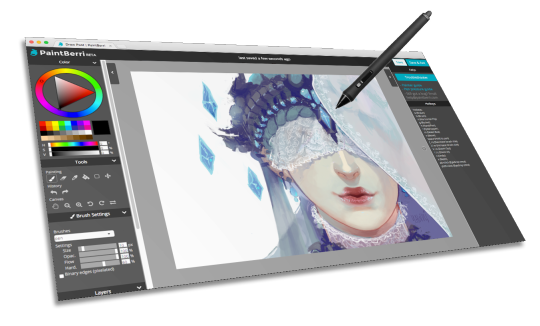
PaintBerri is a drawing site for doodles and art roleplay. Come hang out with us!
Paint online, for free
All art on the PaintBerri is drawn directly
on the site! Our powerful web painter supports pen pressure* and comes
with your favorite painting tools, including opacity lock, select tool,
and brush customization!
Join a fun and sociable community! Find groups you like and make new friends.
Create stories together
Collaborate on comics and art roleplays,
share your thoughts, or challenge yourself artistically. Our commenting
options are an open canvas for creativity!
Late last year I wanted to start a series of short tutorials called Tip Jar, as a way of saying thanks to my fans and giving back to my patrons. This is the first of the series I have made, showing my technique on quickly filling in lineart so you can get to painting without coloring outside the lines faster.
Someday I hope to turn these into video tutorials when I have the income and the time, but for now I hope that I will be able to share useful tips in this infographic format.
Worth sharing because this is exaaaaactly how I do my flats! I get this question all the time when I post my process videos, and this explains it far more succinctly than I ever could. 🙂
Guys this is EXACTLY my process. If you wanna make it go a bit faster go under Photoshop preferences to edit shortcut keys where you can change keyboard shortcuts to quickly modify and expand/contract your selections. It’s a good habit to get into instead of clicking the drop down menus every time :>
catch of breath, choke, gulp, heave, inhale, pant, puff, snort, wheeze, huff, rasp, sharp intake of air, short of breath, struggle for breath, swallow, winded
Do you cry whenever you sharpen your lead because you know how expensive that lead was? Then dump that dust out and use it!
You now have free powdered graphite! (If you don’t use a lead pointer, you can buy a solid graphite stick and take a hammer to it – yes, I’ve done this – or you can just go ahead and buy powdered graphite.) You can use a dry brush to paint it on your pencil drawings for a soft, light blended effect. Or…
Add a drop or two of water and mix until it dissolves. Remember that softer lead will produce darker effects, so add more or less water depending on how dark or light you want to go.
You now have powdered graphite AND erasable paint!
Paint whatever the crap.
Lift that crap out with an eraser. Darker graphite won’t come out completely, but you can soften, blend, and lighten it. You can also smudge it with a finger or brush.
Then you can go in and detail it with the same pencil you cannibalized to make the graphite powder, and it’ll all blend together because it’s the same crap.
But painting with graphite is nice because you can block in large areas and detail on top of it. And sometimes you just want to have a “brush” effect, which isn’t so quick and easy with a pointy pencil, or maybe you want to be free and loose the way only a brush can let you be.
There you go! Graphite paintings from repurposed waste materials!
something I accidentally discovered today! (I’d imagine a lot of color theory stuff was involved with computer fonts that makes them readable and not all pixelated)
It’s called Booster Buddy, it’s free, and it’s available for both Android and iOS.
It works by giving you ‘quests’ (daily tasks) that you are encouraged to complete each day. They are very small things and it caters to you (it asks you questions at the start about what you struggle with).
It’s designed to be child friendly and easy to understand. I’m finding it really helpful. You can also input medication times for a reminder and emergency contact details.
I love this app and I had to share it with you all!
Another tutorial! This one tells you how to make articulated shoulder armor that bends with your arm. The shoulders were probably the most difficult piece for my Tyrael cosplay, so hopefully this will make things a bit simpler for others.





 (ノ´ヮ´)ノ✧