That means free access to Photoshop CS2 – and that already has most of what you could ask for, really.
All you have to do is create a FREE ADOBE ID.
I am not sure about commercial use, but MAN. SWEET DUDE
Reblogging for the greater good.
I’m unlikely to pick it up as I honestly never use PS anymore, but here everyone who follows me. Free stuff.
oh wow this is perfect i was just lamenting that i’d have to buy creative suite for my new laptop WELP
Signal boost for any of my followers who need art programs!
The cs2 programs date back only a few years, and still have much of the functionality of today’s more modern ones. The differences between most of the versions are little more than slight modifications or additions of minor features, and UI changes. Go for it guys!!
yo here’s a useful tip from your fellow art ho cynellis… use google sketchup to create a model of the room/building/town you’re trying to draw… then take a screenshot & use it as a reference! It’s simple & fun!
Sketchup is incredibly helpful. I can’t recommend it enough.
There’s a 3D model warehouse where you can download all kinds of stuff so you don’t have to build everything from scratch.
So, pretty frequently writers screw up when they write about injuries. People are clonked over the head, pass out for hours, and wake up with just a headache… Eragon breaks his wrist and it’s just fine within days… Wounds heal with nary a scar, ever…
I’m aiming to fix that.
Here are over 100 links covering just about every facet of traumatic injuries (physical, psychological, long-term), focusing mainly on burns, concussions, fractures, and lacerations. Now you can beat up your characters properly!
Wound assessment: A huge amount of information, including what the color of the flesh indicates, different kinds of things that ooze from a wound, and so much more.
Location pain chart: Originally intended for tattoo pain, but pretty accurate for cuts
General note: Deeper=more serious. Elevate wounded limb so that gravity draws blood towards heart. Scalp wounds also bleed a lot but tend to be superficial. If it’s dirty, risk infection. If it hits the digestive system and you don’t die immediately, infection’ll probably kill you. Don’t forget the possibility of tetanus! If a wound is positioned such that movement would cause the wound to gape open (i.e. horizontally across the knee) it’s harder to keep it closed and may take longer for it to heal.
General notes: If it’s a compound fracture (bone poking through) good luck fixing it on your own. If the bone is in multiple pieces, surgery is necessary to fix it–probably can’t reduce (“set”) it from the outside. Older people heal more slowly. It’s possible for bones to “heal” crooked and cause long-term problems and joint pain. Consider damage to nearby nerves, muscle, and blood vessels.
General notes: If you pass out, even for a few seconds, it’s serious. If you have multiple concussions over a lifetime, they will be progressively more serious. Symptoms can linger for a long time.
Dislocations: Symptoms 1, 2; treatment. General notes: Repeated dislocations of same joint may lead to permanent tissue damage and may cause or be symptomatic of weakened ligaments. Docs recommend against trying to reduce (put back) dislocated joint on your own, though information about how to do it is easily found online.
The other day I came across this awesome program by accident
(I don’t even remember what I was actually searching for, but on the several
times I’ve looked for a program like this I’ve had no luck). It’s cool enough that I wanted to share it.
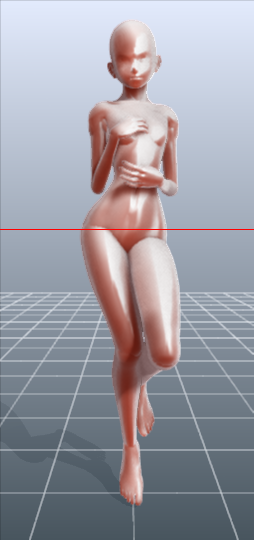
It’s called DesignDoll (website here) and it’s a program that lets you shape and pose a human figure pretty much however you want.
There’s a trial version with no expiration date that can be
downloaded for free, as well as the “pro license” version priced at $79.
I’ve only had the free version for two days so far, so I’m not an expert and I
haven’t figured out all of the features yet, but I’ve got the basics down. The
website’s tutorials are actually pretty helpful for the basics, as well.
Here’s the page for download, which has a list of the
features available in both versions.
There are three features the free version doesn’t have:
Can’t save OBJ files for export
Can’t download models and poses from Doll
Atelier (a sharing site for users; note that the site is in Japanese, though)
It can’t load saved files
The third one means that if you make a pose, save it, and
close the program, you can’t load that
pose/modified model later. You have to start with the default model. I
found that out when I tried to load a file from the day before (this is why
reading is important…). Whether saving your modifications (and downloading models and poses) is worth $80 is up to you.
But, the default
model is pretty nice and honestly if all you’re looking for is a basic pose reference
it should work fairly well as it is. Here’s what it looks like:
There’s a pose tag
that lets you drag each joint into place and rotate body parts. The torso and
waist can be twisted separately, and it seems like everything pretty much
follows the range of movement it would have on an actual human.
Even the entire shoulder area is actually movable along with the joint! See, like how the scapular area of the back raises with the arm:
The morphing tag
is one of the coolest features, in my opinion. It lets you pick and choose from
a library of pre-set forms for the head, chest, arms, legs, etc. It has some more realistic body shapes in addition to more anime-like ones. Don’t like the
options there? Mix a few to get what you want! Each option has a slider that
lets you blend as much or as little as you want into the design.
So you, too, can create beautiful things like kawaii
Muscle-chan!!
The scale tag
lets you mess with the proportions and connection points of different joints. This
feature combined with the morphing feature not only allows more body shape
variations, but it also means that you can do things like make a more digitigrade
model if you want. (The feet only have an ankle joint, but for regular human poses that’s all that you really need, so whatever.)
Or you can make a weird chubby alien-like thing with giant
hands and balloon tiddies if that’s more your thing.
The ability to pose
hands to the extent it allows is far more than I could have hoped for from
a free program. Seriously, you can change the position of each finger joint individually, as well as how spread out the fingers are from each other. Each crease on the diagram below is a point of movement, and the circles are for spread between fingers.
And to make it a bit more convenient, there’s a library of pre-set hand poses you can pick from as well, and then change the pose from that if you like.
In both versions, you can also import OBJ files from other places for the model to hold, like if you wanted to have them hold a sword or something.
Basically, this program is awesome and free and you should
totally check it out if you want a good program for creating pose references.
Side Burn Deluxe is an INCREDIBLE resource for hairstyles of all shapes and sizes and colors! Each one is amazing and unique and this site is brilliant and awesome serIOUSLY take heed and make good use of this!
I get quite a few questions about where I find my stock images that are used in live previews so here’s a list of my favourite (all can be found on the resources page). Most of these are free to use on personal and commercial projects but double check the licenses before use.
I found this great tutorial about making leggings that are custom fit to your body. It includes drawing out your pattern and an Exel sheet to input your measurements and get the measurements for the pattern. Just tried it out myself and the leggings fit me like a glove.




 (ノ´ヮ´)ノ✧