fun fact! google image search allows you to search for images that you are legally allowed to use for example as textures for your art or as assets for your blogs and websites
I keep forgetting that not everyone knows about this.
HEY WRITERS OF ALL KINDS AND AGES AND MAYBE EVEN DNDERS OR TABLETOP GAMERS ARE YOU READY FOR SOMETHING SUPER RAD? I HOPE SO ‘CAUSE
RANDOM
MAP
GENERATOR
WITH
EDITING FEATURES AVAILABLE
IT DOESN’T REALLY DO LAND MASSES OR ANYTHING BUT IT SURE AS HELL WILL MAP THAT CITY/VILLAGE/SHIP/DUNGEON/WHATEVER THAT YOU’VE BEEN MEANING TO MAP OUT FOR YOU
Animation software is, by and large, very expensive and out of the range of most people seeking to get into animation. As of March 26th, this software will become open source and available to all prospective animators!
z̗̟̻̫̼͓͂ã̤̬͓̼͓̔̐̇͑ͩ̀l̯̜̰͐̒ͪg̺͎͈̍o͍̫̬̤ͭ ͍ͩͤ̈́a͇̘͙̼̠̪̣ͨ̾̍̿k̼ͣa̯̮͇̟ͫ̑ͤͭ̔̊ͣͅ ͌͆s̮̫̼͖̫̖̐̆ͦc̎ͪÃ͔̬̘̫̣̮̮̂̉͗R̈́Ẏ̖͕͚̱̩̠ ̫̝͎̞͖̄T͔̎͊̍ͪ̔E̲̞̽ͨ̿̑X͓̜̩̖̜ͦ͊T̹̥̰̊̎͂ found here
here and here for ƒαηcу/սռﻨƈօժε †εχ† (☞ here for unicode symbols ☜)
Shamchat.com – like Omegle, except you pretend to be someone you’re not. Might be a fun way to roleplay, mess around with character types, archetypes, etc. Enjoy!
Want to see someone else’s likes? http://www.tumblr.com/liked/by/callmeblake
(only works if they have their likes public though).
Just insert their tumblr name at the end of that URL (in place of callmeblake).
TAGS:
Tags are a wonderful way to organize your blog, and most people don’t seem to realize that if you reblog a post, it will not show up in tumblr search with your tag, but only in your own blog. Only ORIGINAL posts will show up in the main search with your tags so make the most of that.
Avoid “&”,“+”,“/”,“%” and (right now) dashes “-” and question marks “?”, tumblr tags don’t know what to do with these and if someone clicks on that tag on your blog they will go nowhere.
Whoa! “What’s with the %20 you say?”, it’s what tumblr turns the spacebar into, you can also use an underscore and tumblr will still find it.
TRACKED TAGS SEARCH LIMIT?:
I know it’s frustrating, but you can in fact only have twenty tracked tags before the tags you are tracking will not show new ones beside them anymore. You can still use it to get SEE them, you just have to check them all manually.
I also read something last night that said after a certain amount of tags on your post the extra ones will no longer show up in search, don’t know how true it is though. Edit: according to justcantdescribeu “Normally, tumblr only indexes your first 5 tags on any post, and tumblr only indexes tags if it’s on an original post, not a reblog. By indexing, I mean the part where you search up tags on tumblr through the sidebar on your dashboard (tumblr.com/tagged). The sixth and further tags won’t be indexed, but they can still be searched up on your own blog. ”
and from yetanothercriminalmindsfanatic“re: tags, first 5 of OP’s post show up in the tracked tags. the first 10 of any post are searchable within a blog. posts retain the first 20. attempt 21 or more, and the extras get swallowed up/disappear after clicking publish/queue/save to drafts. (i’ve had the misfortune of encountering this before)”
If I do: http://callmeblake.tumblr.com/search/gif on my page I used to get one gif.
Edit: Tumblr has improved search quite a bit since I wrote this.
So the rest of this section may or may not be relvant anymore.
OR : *search term* site:*url*
for example, to search the term “gif” on my tumblr:
“gif site:callmeblake.tumblr.com”
For “gif” for mine, this gets 8 results.
However, tumblr’s search is quite crap and I suggest using google internal search if you want better results.
I get 10 pages of results because it’s just BETTER.
When I went to write this it seems like I had more, I wonder what I’m forgetting.
Edit : Some things I forgot:
Theme Recovery:
Helpful if you are getting into changing you theme through the html editor and make a mistake, saves the last twenty changes.
Audio uploads:
Choose a song from soundcloud search and upload it as a draft, go in and replace it with a song from your computer – you can do this multiple times and avoid the “one audio upload a day”.
No need to open your blog’s dashboard to see how many followers, messages, number of queued posts and drafts are left
alt+click your blog title beside “Dashboard”
Reblog long text posts as a whole and not as a link:
Clicking the gray “As…” button beside “Reblog Text Post” above the post; select “As Text” to reblog the full body of the original post.
Find a post’s source:
Hover on the post on your dashboard, notice that the upper-right flap of the white background becomes slightly bent. Click the flap to go to the original post address.
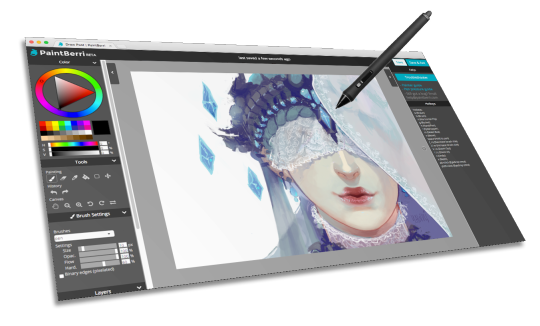
PaintBerri is a drawing site for doodles and art roleplay. Come hang out with us!
Paint online, for free
All art on the PaintBerri is drawn directly
on the site! Our powerful web painter supports pen pressure* and comes
with your favorite painting tools, including opacity lock, select tool,
and brush customization!
Join a fun and sociable community! Find groups you like and make new friends.
Create stories together
Collaborate on comics and art roleplays,
share your thoughts, or challenge yourself artistically. Our commenting
options are an open canvas for creativity!
Google has had the monopoly on search engines for the past decade. The service works in such a way that already popular sites always come up on top, while small companies remain undiscovered on page 10 or even 100, unless they can afford to hire SEO specialists and pander to Google’s algorithms. Now, Million Short is an alternative search engine, which enables users to remove up to the first 1,000,000 Google results, in order to make browsing the web more surprising and give the underdog a fighting chance. READ MORE…


WITH





 (ノ´ヮ´)ノ✧